
MySQL (I): Page Structure, Indexes, and B+ Trees
Notes covering fundamentals, indexes, B+ trees, and execution plans.
From page structure and record format to splits and merges — an interactive InnoDB index internals workbench.
Open visualizerMySQL Fundamentals, Indexes, and B+ Trees#
Fundamentals#
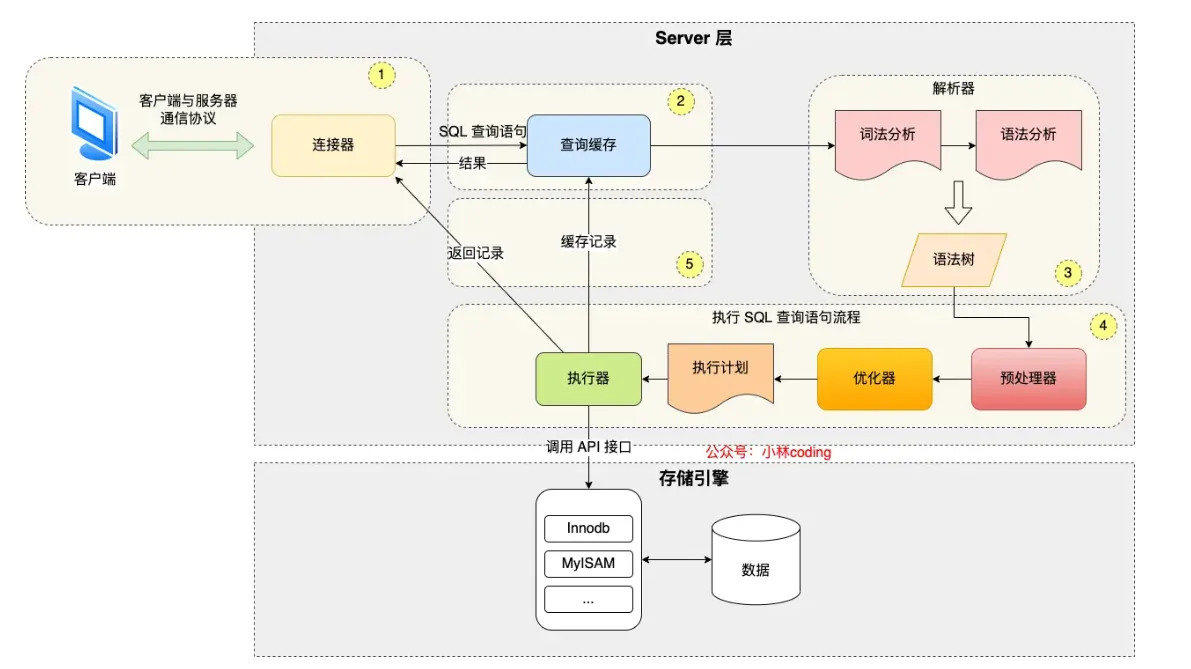
SQL Execution Flow#
- Connector: Establishes connection via TCP three-way handshake and verifies username/password (then reads user permissions)
- Query Cache (before MySQL 8.0): For query statements, checks cache (key-value format)
- Parse SQL:
- Lexical Analysis: Identifies keywords from input
- Syntax Analysis: Based on lexical analysis results, checks if syntax is valid
- If valid, constructs an SQL syntax tree (for later modules to get SQL type, field names, conditions, etc.)
- If invalid, returns error directly
- Execute SQL:
- Preprocessor:
- Checks if tables/fields exist (in MySQL 8.0+, this check happens before preprocessing, after syntax analysis)
- Expands select * to all columns
- (Performance improvement: For repeated statements, can execute repeatedly)
- (Reduces SQL injection: Parameterized queries separate variables from query structure)
- Optimizer: Determines the execution plan for SQL query statements
- When a table has multiple indexes, determines which index to use (EXPLAIN command shows execution plan)
- Executor
- Calls
read_first_recordpointer to InnoDB engine query interface, letting the engine locate records matching conditions- If record doesn’t exist, reports to executor, query ends
- If exists, returns to executor, then executor checks if conditions are met, sends to client if met, then starts loop (queries one by one, user just sees all results displayed together)
- After engine finishes reading, returns completion info to executor, executor receives info, exits loop, stops query
- Calls
- Preprocessor:
Index Pushdown: When searching for a condition after where, includes subsequent conditions in the judgment, reducing the number of table lookbacks (filters more at the engine level, improving efficiency)
Conditions for Index Pushdown: (Must have a suitable index for effective filtering, usually the first condition)
- Simple conditions: Such as equality conditions (=), range conditions (like
>,<,BETWEEN), and some non-null conditions (IS NOT NULL). - Combined conditions: For conditions connected with logical operators (like AND, OR), simple conditions can be combined and pushed down.
SQL Storage#
Database file storage location: /var/lib/mysql/<database>. In this path:
db.opt: Stores database default character set and collation rules- .frm: Stores table structure
- .ibd: Stores table data (independent tablespace file)
- Structure of tablespace file:
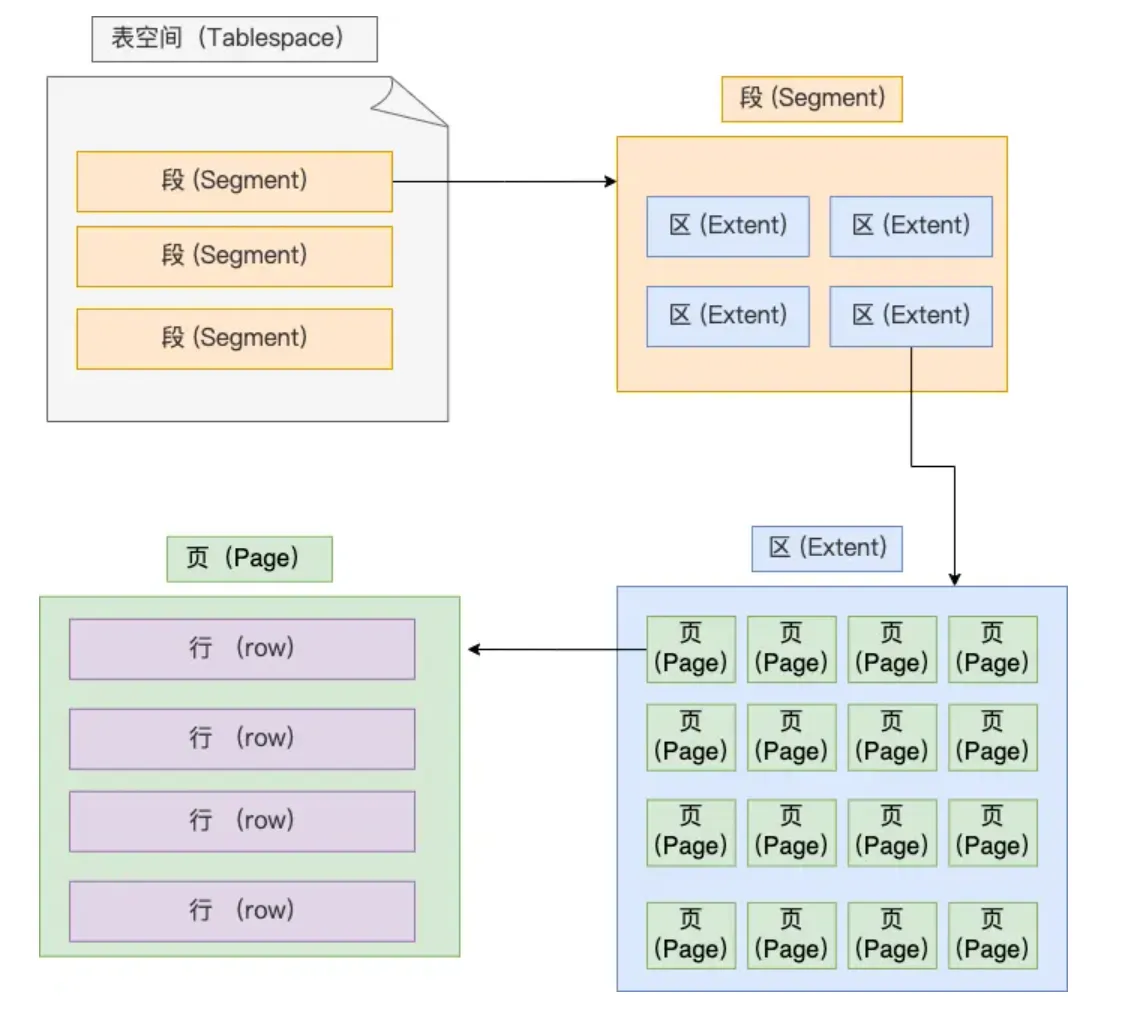
- Row: Table records are stored by row
- Page: Table records are stored by page, database reads by page as unit, entire page read into memory (also the minimum unit for InnoDB engine disk management)
- For each data read:
- First checks cache layer (buffer pool) for data.
- If data not in cache, accesses data file.
- Uses index to quickly locate data.
- Finally reads data page to get actual row data.
- For each data read:
- Extent: When table data is large, space allocation for an index is no longer by page, but by extent. Each extent is 1MB, for 16KB pages, 64 consecutive pages form an extent, making adjacent pages in the linked list also physically adjacent, enabling sequential I/O.
- This is because adjacent pages in the linked list may not be physically adjacent, causing lots of random I/O during disk queries (very slow), so making adjacent pages physically adjacent enables sequential I/O, making range queries fast
- Segment consists of multiple extents. Segments are generally divided into data segments, index segments, and rollback segments.
- Structure of tablespace file:
- InnoDB row formats: (Redundant, Compact, Dynamic, and Compressed)
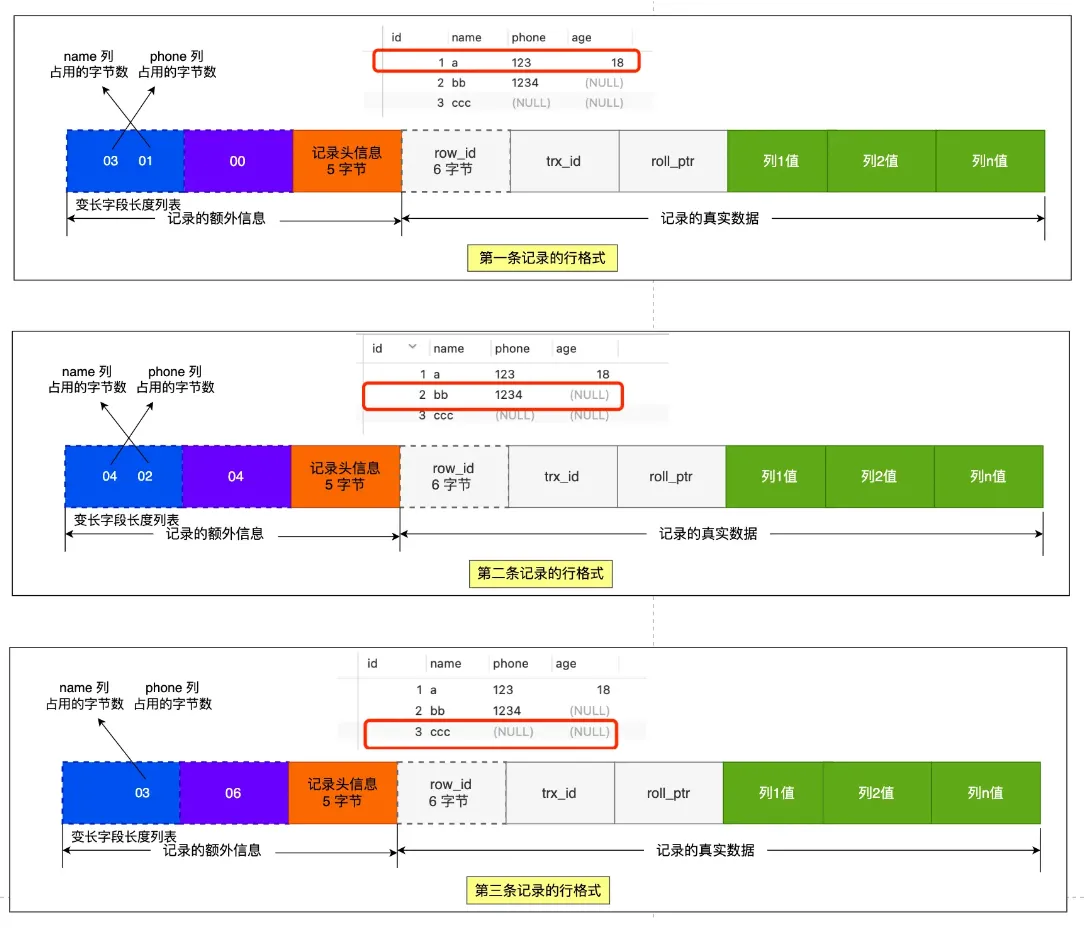
- Record extra information
- Variable-length field length list, stored in reverse order (Q: How exactly is this reverse order? Why store in reverse?)
- Because record header info has a pointer to the next record, pointing to the position between the next record’s header info and actual data, reading left gets header info, reading right gets actual data
- Allows field length info for records at earlier positions and their actual data to be in the same CPU Cache Line, improving CPU Cache hit rate.
- NULL value list: stored in reverse order
- Record header info: Contains many items, common ones: delete_mask, next_record, record_type
- Variable-length field length list, stored in reverse order (Q: How exactly is this reverse order? Why store in reverse?)
- Record actual data
- row_id
- If we specify a primary key or unique constraint when creating the table, there’s no row_id hidden field. If neither primary key nor unique constraint is specified, InnoDB adds row_id hidden field to records. row_id is not required, occupies 6 bytes.
- trx_id
- Transaction id, indicates which transaction generated this data. trx_id is required, occupies 6 bytes.
- roll_pointer
- Pointer to the previous version of this record. roll_pointer is required, occupies 7 bytes.
- row_id
What happens when row overflow occurs? Row overflow: When a page cannot fit a record, the excess is stored in overflow pages
SQL Query Limits#
This question doesn’t have an absolute unified threshold. The original notes left a blank here, now I’ll connect the judgment criteria from the optimization section: Don’t memorize numbers like “20 million per table”, focus more on row size, index levels, access patterns, and whether performance bottlenecks have appeared.
- When rows are very large (close to half page size, about 8KB), a 3-level B+ tree can hold significantly less data, possibly only one to two million;
- When rows are very small, a 3-level B+ tree can theoretically hold a lot of data;
- For a typical business table, when reaching tens of millions of records, should start closely monitoring query RT, CPU, IO, index levels, and scanned pages;
- The right time to consider sharding, hot-cold separation, or archiving is not “reaching some magic number”, but when queries on this table have noticeably slowed down, and it’s confirmed to be caused by data volume, index levels, or scan range.
So a more reliable answer in interviews is:
- First say there’s no absolute limit;
- Then say typical tables reaching tens of millions usually need close attention;
- Finally return to “whether actual bottlenecks have appeared”, like slow SQL, B+ tree getting taller, range scans reading too many pages, full table scan cost too high.
Indexes#
Classification#
- By ‘data structure’: B+tree index, Hash index, Full-text index.
- By ‘physical storage’: Clustered index (primary key index), Secondary index (auxiliary index).
- By ‘field characteristics’: Primary key index, Unique index, Normal index, Prefix index.
- By ‘number of fields’: Single column index, Composite index.
Data Structure#
B+ Tree differs for primary key and non-primary key indexes:
- Primary key index: Leaf nodes store actual data
- Secondary index: Leaf nodes store primary key values
Table Lookup: When using a secondary index to query data, first find the corresponding leaf node through the secondary index’s B+ tree index value to get the primary key value, then query through the primary key index. This process involves table lookup, requiring two B+ trees to query the data
But when the queried data can be found in the secondary index, no table lookup is needed, this process is called covering index
Why choose B+ tree? Explanation by 小林coding ↗
- Compared to B tree: B tree carries more data, can query more nodes with same disk I/O, but not short and fat enough, and B tree node deletion is more complex (B+ tree is more stable), and B+ tree leaf nodes are actually connected by doubly linked list
- Compared to binary tree:
- Compared to Hash: Fast for finding a specific value (extends to: HashMap), but not suitable for range queries
B+ Tree! (Important)#
Concepts I think need to be understood:
- Structure of a data page and the purpose of each part
- How exactly is data filled into the B+ tree? How is it constructed?
For visual description, use canvas to view MySQL mind map
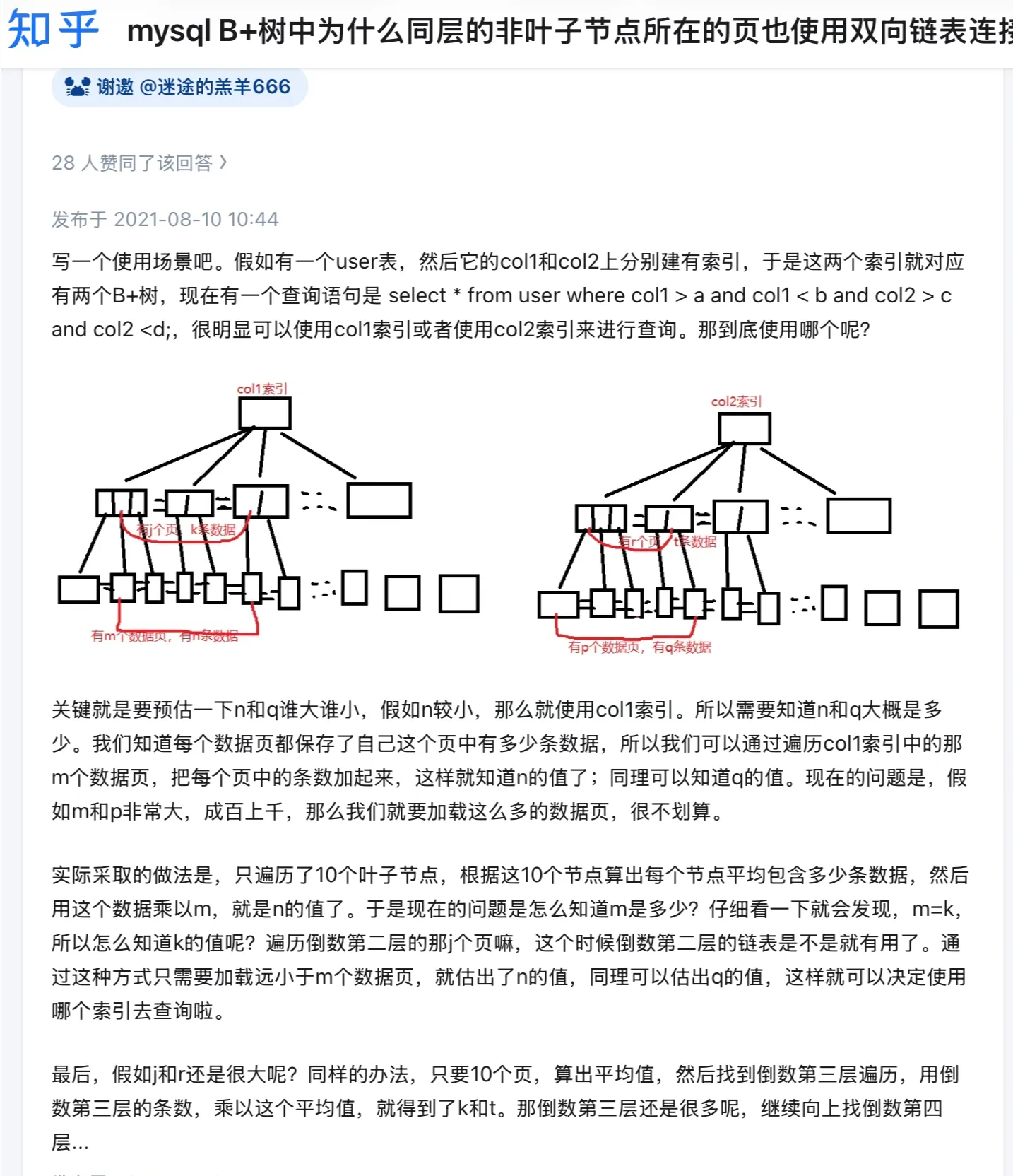
 Kind of confused:
Physical Storage#
Primary key index (clustered index), Secondary index (auxiliary index)
Field Characteristics#
From field characteristics perspective, indexes are divided into primary key index, unique index, normal index, prefix index.
Number of Fields#
Single column index, Composite index
Leftmost Matching Principle#
For composite indexes: There’s a leftmost matching principle: Need to match indexes in leftmost priority order,
If using composite index for queries doesn’t follow this principle, the composite index becomes invalid
For composite index (a,b,c): where condition a=? and b=? and c=? Due to optimizer existence, order here can be swapped, index won’t become invalid But for b=? and c=? without even a, composite index becomes invalid, i.e., match as much as possible
Composite Index Range Queries*#
For composite index range queries: Q1: select * from t_table where a > 1 and b = 2, for composite index (a, b), which field uses the composite index’s B+Tree?
Under the condition a>1, field b’s values are actually unordered, so can’t reduce scanned records based on condition b=2, i.e., field b cannot use composite index for queries
Q2: select * from t_table where a >= 1 and b = 2, for composite index (a, b), which field uses the composite index’s B+Tree?
Under the condition a>=1, field b’s values are actually unordered, but within the range of secondary index records where a=1, field b’s values are ordered!, so here both a and b fields use the composite index.
Q3: SELECT * FROM t_table WHERE a BETWEEN 2 AND 8 AND b = 2, for composite index (a, b), which field uses the composite index’s B+Tree?
In MySQL this is >=2&&<=8, so both can use composite index for queries!
Q4: SELECT * FROM t_user WHERE name like ‘j%’ and age = 22, for composite index (name, age), which field uses the composite index’s B+Tree?
Within the range of secondary index records matching prefix ‘j’ for name field, age field values are ‘unordered’, but within the range of secondary index records matching name = j, age field values are ‘ordered’
For the case name='j' and age=20, it will be directly ignored. In Q4 query statement, both a and b fields use composite index for index queries.
Specifically shown in EXPLAIN <SQL> results, check the
key_lenfield size
What exactly is index pushdown? ICP is an optimization strategy for the execution position of judgment conditions during index access, occurring in the “index traversal” phase. Its core idea is: “push down” some filter conditions to the index level, letting the index engine filter records meeting conditions in advance when scanning index pages, reducing subsequent table lookup queries (accessing data rows). ICP is not a new index structure, but an access optimization based on existing indexes.
Index selectivity: number of distinct values in a column / total number of rows
When selectivity is very low and particularly uniform, better not to use index. Query optimizer generally ignores index and does full table scan when percentage reaches 30%
Composite index for sorting: select * from order where status = 1 order by create_time asc
Using index ordering, building composite index on status and create_time columns, so data filtered by status is already sorted by create_time, avoiding file sorting, improving query efficiency.
Here building composite index on (status,create_time), first sorts by status, then sorts by create_time within status
When to Use Indexes#
Scenarios suitable for using indexes:
- Fields with uniqueness constraints
- Fields frequently used as query objects after where conditions
- Fields frequently used after group by and order by conditions
Scenarios not suitable for using indexes:
- Fields not used at all after query conditions
- Fields with lots of duplicate data, as mentioned above, may ignore index and do full table scan
- When table has too little data
- Data that needs frequent updates
Index Optimization & Index Invalidation#
- Prefix index optimization:
- To reduce index field size (suitable for long string fields), use field prefix as index (may already be able to distinguish many fields, saving space/efficiency)
- (Q: Why such limitations?) Limitations: order by cannot use prefix index, cannot use prefix index as covering index
- Covering index optimization;
- (Also mentioned above) Data obtainable from secondary index doesn’t need table lookup, return directly
- Primary key index best to be auto-increment;
- Using auto-increment primary key, each data insertion adds sequentially to current index node position, no need to move
- If using non-auto-increment primary key, may insert in middle position, other data needs to move to accommodate new data, even need to copy data from one page to another (i.e., page split), page split may cause lots of memory fragmentation, affecting efficiency
- (Page split causes fragmentation, fragmentation in turn promotes more page splits, creating vicious cycle, write performance decreases.)
- Index best set to NOT NULL
- NULL in index column makes optimizer’s choices more complex (like during index statistics, count ignores rows with NULL values)
- NULL is a meaningless value, but occupies at least 1 byte of space
- Prevent index invalidation; (important)
- Index invalidation scenarios:
- Using left or left-right fuzzy matching, i.e.,
like %xxorlike %xx%both cause index invalidation; - Any calculation on index column in query conditions causes index invalidation
- Not following leftmost matching principle
- In where clause, if before OR is index column, after is not index column, index becomes invalid
- Using left or left-right fuzzy matching, i.e.,
- Can use EXPLAIN for reference
- Index invalidation scenarios:
Q: How does NULL as index affect performance, how does it become complex?
- In B+ tree, NULL is considered a special value, placed at beginning/end, fixed position and doesn’t participate in normal value comparisons
- Cannot quickly locate through range scan (needs
<field> IS NULL)- Affects optimizer’s plan
MySQL pagination performance issues:
- If offset not large, directly use limit, size pagination
- If offset very large, then:
- Following loop idea, move one by one each time (i.e., expose previous page/next page)
- Like search engines, only show first X pages (20/50?)
Execution Plan: EXPLAIN!#
MySQL Execution Plan Analysis | JavaGuide ↗
mysql> explain SELECT * FROM dept_emp WHERE emp_no IN (SELECT emp_no FROM dept_emp GROUP BY emp_no HAVING COUNT(emp_no)>1);
+----+-------------+----------+------------+-------+-----------------+---------+---------+------+--------+----------+-------------+
| id | select_type | table    | partitions | type  | possible_keys   | key     | key_len | ref  | rows   | filtered | Extra       |
+----+-------------+----------+------------+-------+-----------------+---------+---------+------+--------+----------+-------------+
|  1 | PRIMARY     | dept_emp | NULL       | ALL   | NULL            | NULL    | NULL    | NULL | 331143 |   100.00 | Using where |
|  2 | SUBQUERY    | dept_emp | NULL       | index | PRIMARY,dept_no | PRIMARY | 16      | NULL | 331143 |   100.00 | Using index |
+----+-------------+----------+------------+-------+-----------------+---------+---------+------+--------+----------+-------------+For execution plan, parameters are:
- possible_keys field indicates possible indexes;
- key field indicates actual index used, if NULL, means no index used;
- key_len indicates index length;
- rows indicates number of data rows scanned.
- type indicates data scan type, we need to focus on this.
type field describes the scan method used to find required data, common scan types in order from low to high efficiency: (Try to avoid first two)
- All (full table scan);
- index (full index scan); No need to sort data, but overhead still very large
- range (index range scan);
- ref (non-unique index scan);
- eq_ref (unique index scan); (usually used in multi-table joins)
- const (primary key or unique index scan with only one result): (usually compared with a constant, query efficiency higher)
Q: What exactly is the difference between ALL and INDEX?
Extra: This column contains extra information about how MySQL parses the query. Through this information, can more accurately understand how MySQL actually executes queries. Common values:
- Using filesort: Used external index sorting during sorting, didn’t use table’s internal index for sorting.
- Using temporary: MySQL needs to create temporary table to store query results, common in ORDER BY and GROUP BY.
- Using index: Indicates query used covering index, no table lookup, query efficiency very high.
- Using index condition: Indicates query optimizer chose to use index condition pushdown feature.
- Using where: Indicates query used WHERE clause for condition filtering. Generally appears when index not used.
- Using join buffer (Block Nested Loop): Join query method, indicates when driven table doesn’t use index, MySQL first reads driving table into join buffer, then traverses driven table to query with driving table.
Note: When Extra column contains Using filesort or Using temporary, MySQL performance may have issues, should try to avoid.